Blog · August 7, 2026
How to Photograph Clothing Without a Model: 5 Methods Compared
Short answer
You can photograph clothing without a model in five ways: flat lay, hanging, on a mannequin, ghost mannequin, or by generating an AI model from a flat photo. The first four are cheap but don’t show fit on a body. An AI mockup app like Mockup Tool turns your flat photo into a realistic on-model image in about 15 seconds on iPhone, so you get the shot that answers fit without booking anyone.
The on-model shot is the photo that sells clothing — it’s the one that answers fit, drape, and scale — and it’s also the hardest to produce. A model means casting, a fee, scheduling, and a shoot, which is why so many small brands fall back on flat lays or generic templates that convert worse. The good news: you can get the on-model shot without hiring anyone, from a single flat photo you take yourself.
5 ways to photograph clothing without a model
- Flat lay: the garment laid on a plain surface, shot from directly above. Costs nothing and shows print and color well, but gives no sense of fit or scale.
- Hanger: the piece hung against a wall or backdrop. Fast and natural for dresses and outerwear, though the shape reads limp and the hanger is always in the story.
- Mannequin or dress form: shows structure and silhouette. It’s a one-time purchase, but it only ever represents one body shape.
- Ghost mannequin: shot on a mannequin, then the form is edited out so the garment looks worn by an invisible body. Clean and consistent, but it needs editing time or a retoucher for every image.
- AI-generated model: photograph the garment flat, then generate a realistic model wearing it. It’s the only no-model method that shows the piece on a body, and it takes about 15 seconds per image in Mockup Tool.
Most stores end up combining two of these: a flat lay or ghost mannequin for the detail shots, plus an on-model image as the lead photo. That lead image matters most, because it’s the one that answers “how will this look on me?” If you want the longer comparison of the first three styles, our guide to flat lay vs ghost mannequin vs on-model photos covers what each one does to conversion.
Why the model is the bottleneck
Everything else in a product shoot has gotten cheap — phones shoot great flat lays, and daylight is free. The model is the part that stubbornly still costs money and time: fees per hour, scheduling around availability, and a reshoot whenever you add a design. For a store with dozens of designs or frequent drops, that math never works. Removing the model from the equation is what finally makes on-model imagery affordable at scale.
The workflow: flat photo in, on-model out
The approach is simple: photograph your garment laid flat, then let AI generate the model wearing it. Upload your flat photo to Mockup Tool and it produces an on-model image — a realistic model in your exact garment, with natural drape and lighting — in about 15 seconds on iPhone, at 4K. Because it’s built from your real garment rather than a stock blank, the fit and print carry over accurately and the image is unique to your store. It runs the same engine as our free mockup generator.
Get the flat photo right first
The generated model is only as good as the photo you feed it. Lay the garment flat, steam or smooth every wrinkle, and shoot straight down in soft window light with the whole piece in frame. A clean, well-lit flat lay produces a mockup that looks like a campaign shot; a wrinkled shirt on a bedsheet produces exactly that on a model. Two careful minutes here set the ceiling for everything downstream.
Drag the handle to compare a flat input photo with the generated on-model result:


Show a range of models, not just one
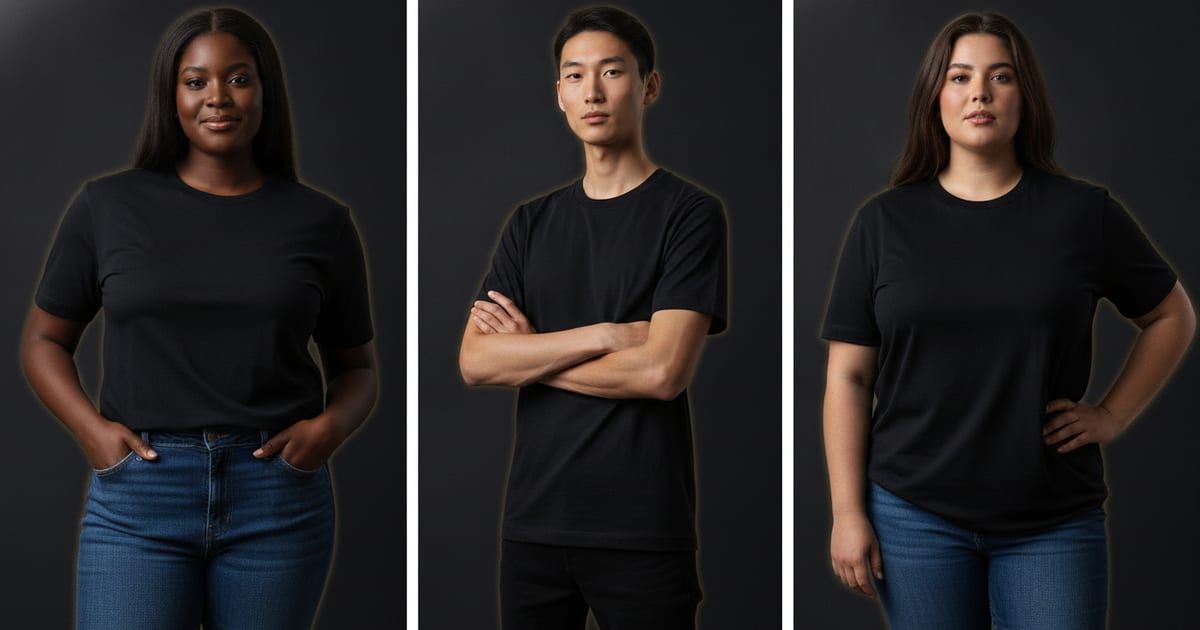
A real advantage of generating models is variety without extra shoots. Mockup Tool can generate diverse models across body types, so you can show the same garment on people who look like your actual customers instead of whatever one model a template happened to use. Generate a few variations per design and lead with the one that fits your audience. One note on expectations: the models are AI-generated for variety — you’re choosing from generated looks, not uploading a photo of a specific person to become the model.
Photographing clothing without models, step by step
If you searched for how to photograph clothing without models, here’s the whole method in one place: (1) lay the garment flat and smooth it; (2) shoot straight down in soft daylight with the full piece in frame; (3) generate the on-model image from that flat photo; (4) pick the body type that matches your audience; (5) export at 4K for the listing. No model, no studio, no shoot day — just a flat photo and a generated model. It’s the same routine whether you’re doing one product or a whole catalog, which is what makes it scale.
When you still want a real model
AI on-model images cover the everyday need — catalog shots, listing photos, and design previews — same day and at a fraction of the cost. They’re previews built from your garment, not a substitute for every situation: a flagship brand campaign with specific art direction, or imagery built around a real person or community, still calls for a real shoot. For the other 90% of a store’s images, generating them is the faster, cheaper path to photos that look professional.
Frequently Asked Questions
What is the best way to photograph clothes without a model?
For detail shots, a clean flat lay or ghost mannequin works well and costs little. For the main listing image, an AI-generated model built from your flat photo is the only no-model method that shows the garment on a body, which is what answers fit.
Can I get on-model clothing photos without hiring a model?
Yes. Photograph your garment laid flat and use an AI mockup app like Mockup Tool to generate a realistic model wearing it in about 15 seconds. It’s free to download on iOS, and because the image is built from your real garment, the fit and print stay accurate.
Do the AI-generated models look realistic and diverse?
Yes — you can generate the garment on a range of body types and looks, so the images can reflect your actual customers rather than one stock model. You pick from the generated variations that fit your audience.
Can I upload a photo of a specific person to be the model?
No. The models are AI-generated for variety; you choose from generated looks rather than supplying a particular person’s photo. The garment, however, comes from your own product photo.
Is it cheaper than a photoshoot?
Considerably. There’s no model fee, casting, or scheduling — a full set of on-model images costs a fraction of a single studio photo, and it’s ready the same day you photograph the garment.
How do you photograph clothing without models?
Photograph the garment laid flat in soft daylight, then generate the on-model image from that flat photo with an AI mockup app like Mockup Tool. The AI puts your real garment on a realistic model in about 15 seconds, so you get the on-model shot without a model, studio, or shoot day.
