Blog · November 9, 2026
How to Photograph a Hoodie for Your Store
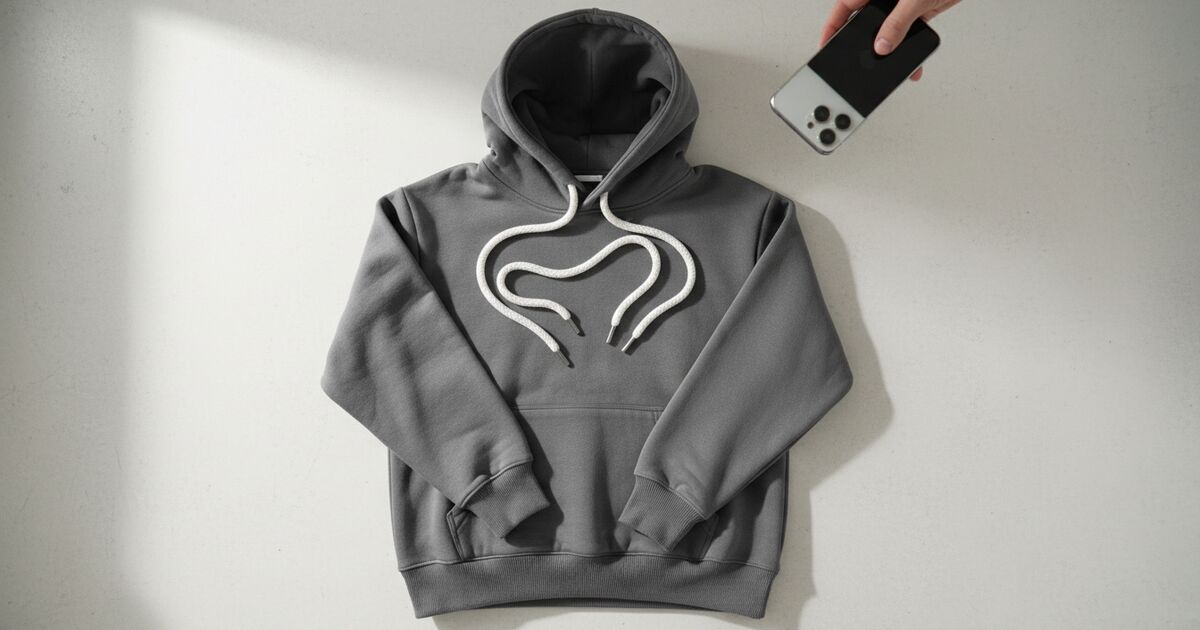
Short answer
To photograph a hoodie, lay it flat on a plain background in soft, even window light and shoot straight down from directly above. Smooth the body, shape the hood so it reads, lay the drawstrings evenly, and flatten the front pocket. Keep the fabric texture sharp and leave a margin around the garment. A clean flat photo like this is also what an AI mockup generator needs to place the hoodie on a model accurately.
A hoodie is harder to shoot than a t-shirt, and for a simple reason: it has more parts that can look wrong. The hood can collapse into a shapeless lump, the drawstrings tangle, the kangaroo pocket puckers, and the heavier fabric shows every wrinkle. Get those details right on a flat photo and everything downstream improves — the listing looks professional, and any on-model mockup you generate from the photo comes out accurate. Here’s how to do it with a phone and a window.
Light it evenly, no harsh shadows
Shoot near a large window with soft, indirect daylight, and turn off mixed room lamps so the color stays neutral. A heavyweight hoodie has deep folds, and hard light turns those folds into harsh shadow lines that read as creases. Even light keeps the fabric looking full and the color true. If one side falls into shadow, bounce a little light back with a white board or a sheet of paper.
Shoot straight down
Lay the hoodie flat on a clean, plain surface that contrasts with it, and shoot from directly above with the phone parallel to the floor. Any tilt skews the shape and makes the garment harder to place cleanly in a mockup later. Fill the frame with the whole hoodie, cuffs and hem included, and leave 10–15% margin around the edges so nothing is cropped.
The hoodie-specific details
- Hood: shape it so it reads as a hood — lay it open and slightly rounded, not flattened into a flap.
- Drawstrings: pull them even and lay them straight or in a simple symmetric curve, tips visible.
- Pocket: smooth the kangaroo pocket flat so it doesn’t pucker or cast a shadow line.
- Sleeves: lay them straight and slightly away from the body so the shape of the arm reads.
- Fabric: steam or smooth out wrinkles; on heavyweight fleece, texture is a selling point — keep it sharp.
Shoot-Ready Checklist
0 / 7Tick everything off and your flat lay is ready for a clean AI mockup.
Why the flat photo decides the mockup
If you plan to turn the flat shot into an on-model image, the input photo sets the ceiling for quality. Mockup Tool generates the hoodie on a realistic model from your flat photo, carrying over the print, the color, and the fabric — so a clean, evenly lit, square-on shot renders a believable mockup, while a dark or skewed one carries those flaws onto the model. Shoot the flat photo once, carefully, and you can generate a full set of on-model and lifestyle images from it.
What a flat photo can’t fix
A good flat lay shows the garment honestly, but it still reads as a flat object — it can’t show how the hoodie drapes on a body or how the hood sits on the shoulders. That’s exactly the gap an on-model mockup fills. Photograph the hoodie flat for the clean product shot, then generate the on-model version to show fit and drape, and use both in the listing.
Frequently Asked Questions
How do I photograph a hoodie for my store?
Lay it flat on a plain, contrasting background in soft window light and shoot straight down from above. Shape the hood, lay the drawstrings even, smooth the pocket, and keep the fabric texture sharp. Leave a margin around the garment so nothing is cropped.
How do I keep the hood from looking flat?
Lay the hood open and slightly rounded so it reads as a hood rather than a flap, and light it evenly so its shape shows. Avoid hard light, which flattens the form with harsh shadows.
Do I need a studio to shoot a hoodie?
No. A large window for soft daylight, a plain background, and a phone shot straight down are enough. The key is even light and a square-on angle, not expensive equipment.
Can I turn the flat hoodie photo into an on-model image?
Yes. An AI mockup generator like Mockup Tool places your hoodie on a realistic model from the flat photo, carrying over the print, color, and fabric. The cleaner the flat shot, the more accurate the mockup.
