Blog · September 28, 2026
Baseball Tee Mockups: How to Make Them
Short answer
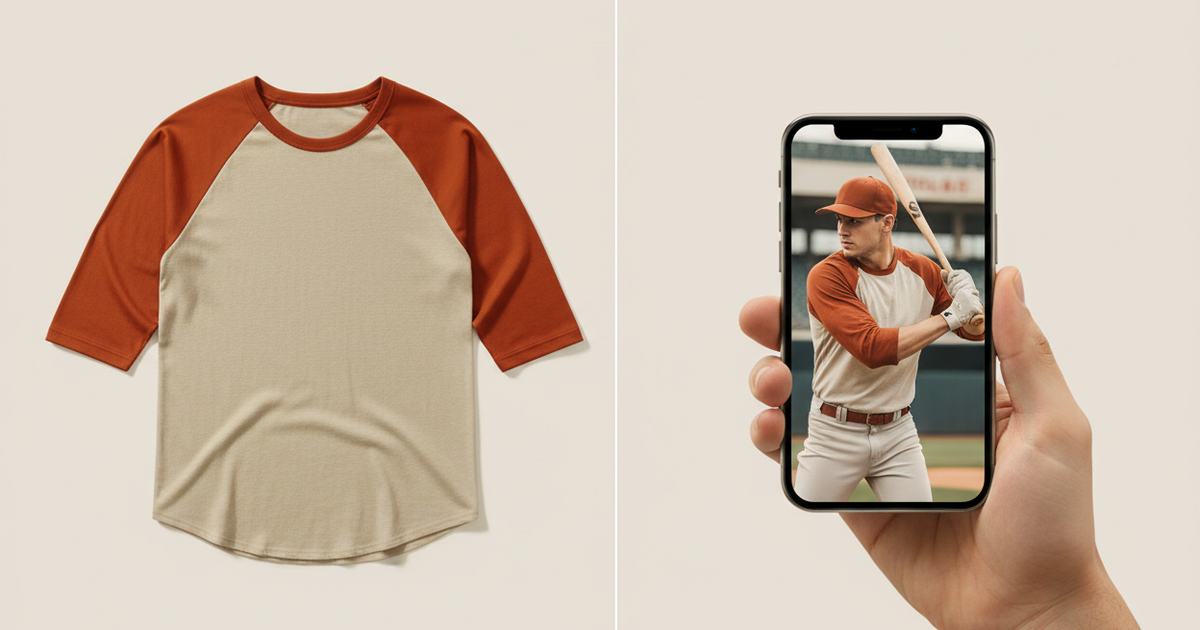
To make a baseball tee mockup, photograph your raglan tee flat in even light, then use an AI mockup generator to put it on a model — this keeps the contrast ¾ sleeves and diagonal raglan seam that templates flatten or replace with a plain crewneck. Mockup Tool builds it from your real tee in about 15 seconds on iPhone at 4K.
The whole point of a baseball tee is the contrast: colored three-quarter sleeves against the body, the diagonal raglan seam running from underarm to collar, the slightly athletic cut. That’s the style someone is buying — and it’s exactly what generic mockups lose. Most template libraries don’t stock a true raglan, so sellers end up displaying a baseball tee on a plain crewneck model, and the signature detail vanishes. A mockup from your actual raglan keeps it.
Why templates get raglans wrong
A raglan isn’t a normal tee with colored sleeves painted on — the seam runs diagonally, which changes how the shoulder sits and how the contrast panel reads. Template tools built around standard set-in-sleeve tees either don’t offer a raglan at all or fake it with a flat overlay, so the diagonal seam looks wrong and the sleeve color sits in the wrong place. The customer sees a garment that isn’t the one you’re selling.
How to make a baseball tee mockup
- Lay the tee flat, smoothed, with both contrast sleeves and the raglan seam clearly visible.
- Light it evenly and shoot straight down so the seam line and sleeve color stay true.
- Fill the frame with the garment; keep the background plain.
- Run it through Mockup Tool to generate it on a model — raglan seam and sleeve contrast preserved from your photo.
- Generate a slightly angled shot so the diagonal seam reads on the shoulder.
Because it’s built from your real tee, the contrast sleeves, diagonal seam, and athletic cut carry over onto the model instead of being replaced by a plain crewneck. The cleaner the flat lay, the more accurately the raglan detail renders.


What it shows — and what it doesn’t
A baseball tee mockup is a realistic preview of the raglan style on a body — sleeve contrast, seam, cut — not a technical fitting. It shows how the style reads; it won’t certify exact sleeve length on a specific person. For listing and social images, it replaces the studio shoot at a fraction of the cost.
For band merch, college, and vintage lines
Baseball tees carry band merch, college drops, and vintage-inspired lines — audiences that know exactly what a raglan should look like and notice when it’s faked. One flat photo per design produces the on-model shots that show the style people actually want, without a shoot per colorway. See the baseball tee mockup generator, or start with the free mockup generator.
Frequently Asked Questions
How do I make a baseball tee mockup?
Photograph the raglan tee flat in even light with both contrast sleeves and the diagonal seam visible, then use an AI mockup generator like Mockup Tool to place it on a model. Building from your real tee keeps the raglan detail templates flatten or replace with a plain crewneck.
Why do baseball tees look wrong in template mockups?
Most template libraries don’t stock a true raglan, so they display your baseball tee on a standard crewneck or fake the diagonal seam with a flat overlay. The signature contrast sleeve and seam end up looking wrong, misrepresenting the product.
Can I make baseball tee mockups without a model?
Yes. An AI mockup generator places your raglan tee on a realistic model from a flat photo — no model or shoot. Mockup Tool runs on iPhone, generates in about 15 seconds, and exports at 4K.
Will the contrast sleeves and seam stay accurate?
They carry over because the image is built from a photo of your real raglan, not a generic template. The clearer your flat lay, the more precisely the sleeve color and diagonal seam render on the model.
