Blog · September 18, 2026
Sweatshirt & Crewneck Mockups: How to Make Them
Short answer
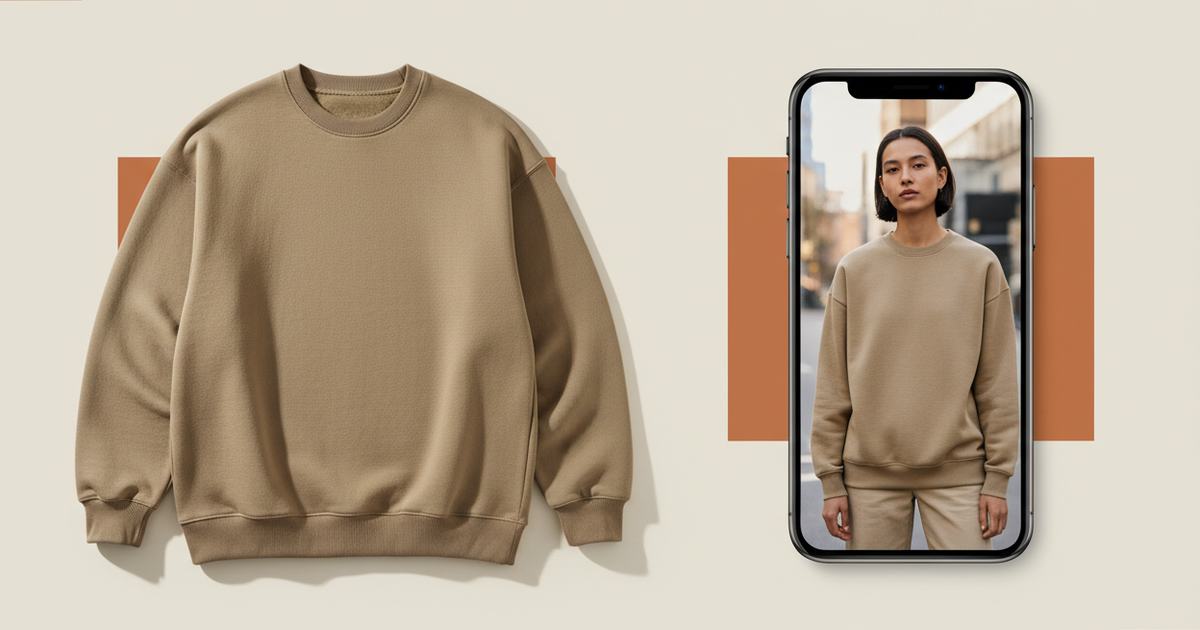
To make a crewneck sweatshirt mockup, photograph it flat in even light, then use an AI mockup generator to put it on a model — this restores the fabric weight, ribbed cuffs, and drape a flat photo flattens. Mockup Tool builds it from your real sweatshirt in about 15 seconds on iPhone at 4K, so a heavyweight crewneck looks substantial instead of pasted-on.
A crewneck sells on feel — the weight of the fleece, the ribbed cuffs and hem, the way it drapes on a body. All of that is exactly what a flat photo strips out, leaving a flat rectangle of fabric that looks the same whether it’s a premium heavyweight or a thin blank. For merch stores, college brands, and seasonal drops, that flattening costs sales, because the thing that justifies the price is invisible. A mockup puts it back.
What a flat photo hides on a crewneck
Two things vanish when a sweatshirt lies flat: texture and structure. Fleece weight — whether it reads as a substantial 400gsm or a flimsy blank — only shows in how the fabric falls on a body. And the details that signal quality (the ribbing at cuffs and hem, the collar seam, the print sitting on a curved chest instead of a flat plane) need a form to sit on. On a table, a premium crewneck and a cheap one look identical.
How to make a sweatshirt mockup
- Lay the crewneck flat, smooth it, and make sure the cuffs, collar, and hem ribbing are visible.
- Light it evenly and shoot straight down so the print placement and proportions stay true.
- Fill the frame with the garment; keep the background plain.
- Run it through Mockup Tool to generate it on a realistic model — the AI preserves fabric weight and texture from your photo.
- Generate on a couple of body types, and match the backdrop to your season or channel.
Because it’s built from your real sweatshirt rather than a stock blank, the ribbed cuffs, collar seam, and exact print placement carry over — and a heavyweight reads as heavyweight instead of pasted-on. The cleaner the flat lay, the more the texture and structure come through.


What it shows — and what it doesn’t
A sweatshirt mockup is a realistic preview of how the crewneck reads on a body — texture, drape, print placement — not a technical fitting. It won’t certify exact measurements on a specific person or how the fleece pills over time; a real sample still does that. For listing and social images, it replaces the studio shoot and produces them the same day you photograph the garment.
For merch, college, and seasonal drops
This is why crewneck-heavy brands lean on it. Photograph the sweatshirt on your desk, generate a model shot while your coffee brews, and upload it before the samples are even folded — the whole workflow fits between other tasks. For a merch line with many designs on the same blank, generating each one keeps the set consistent without a shoot per design. See the sweatshirt mockup generator, or start with the free mockup generator.
Frequently Asked Questions
How do I make a crewneck sweatshirt mockup?
Photograph the sweatshirt flat in even light with the cuffs, collar, and hem ribbing visible, then use an AI mockup generator like Mockup Tool to place it on a model. Building from your real garment restores the fabric weight and texture a flat photo flattens.
Why do sweatshirts look flat in product photos?
Fleece weight and structure — the ribbing, the drape, the print on a curved chest — only read on a body. Flat on a table, a premium heavyweight and a thin blank look the same, which hides exactly what justifies the price.
Can I make sweatshirt mockups without a model?
Yes. An AI mockup generator places your crewneck on a realistic model from a flat photo — no model or studio needed. Mockup Tool runs on iPhone, generates in about 15 seconds, and exports at 4K.
Does the mockup keep my sweatshirt’s texture?
It builds from a photo of your real garment, so fabric weight, ribbed cuffs, and print placement carry over rather than defaulting to a generic blank. The cleaner your flat lay, the more faithfully the texture shows.
