Blog · July 21, 2026
Flat Lay vs Ghost Mannequin vs On-Model: What Actually Converts
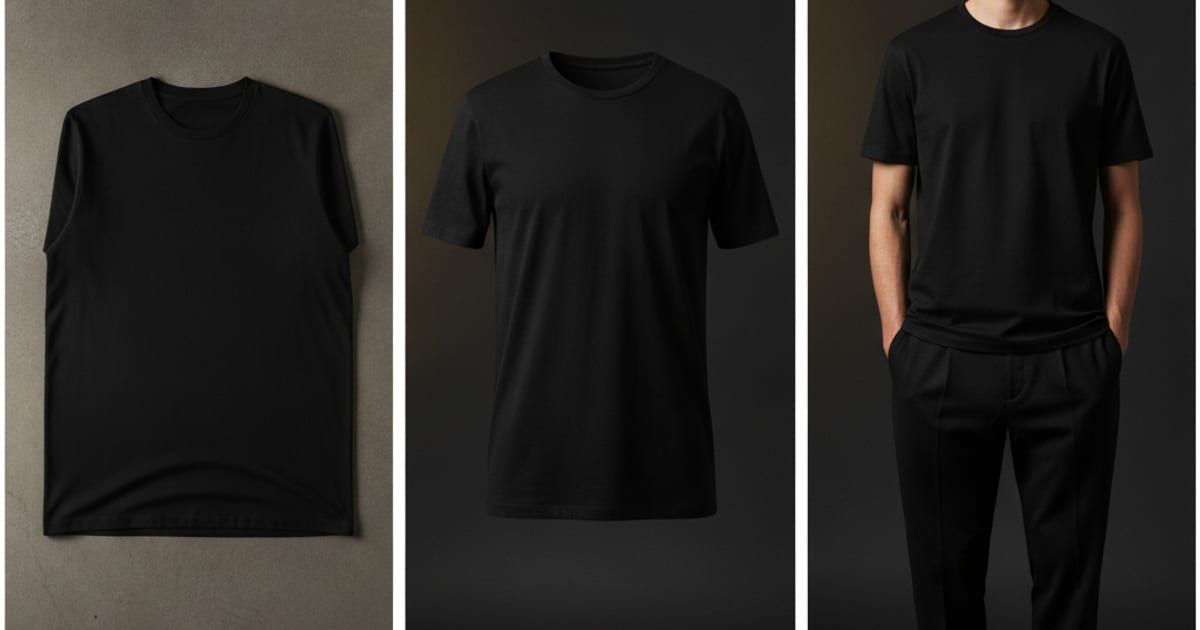
Short answer
On-model photos convert best because shoppers can judge fit, drape, and scale — but they’re the most expensive to produce. Flat lays are cheapest and clearest for detail; ghost mannequin shots sit in between, showing shape without a model. The practical move for a small brand is to lead listings with on-model images and use flat lays for detail — and AI tools like Mockup Tool now generate the on-model shot from a single flat photo, so you get the converting format without a photoshoot.
Photograph a garment three ways and you get three different sales pitches. A flat lay shows the product honestly and cheaply. A ghost mannequin gives it shape. An on-model shot shows a person wearing it. They cost wildly different amounts to produce, and they don’t convert equally — so the real question isn’t which one is “best,” it’s which one earns the click and which one you can actually afford to make.
Flat lay: cheapest and clearest
A flat lay is the garment laid out and shot straight down. It’s the easiest photo to take — a phone, a clean surface, and window light are enough — and it’s the most honest about detail: print placement, color, seams, and fabric all read clearly. The weakness is that clothes aren’t flat in real life. A flat lay can’t show how a tee drapes, where a hem falls, or how an oversized fit actually sits on a body, so shoppers are left guessing about the thing they care about most: how it will look on them.
Ghost mannequin: shape without a person
The ghost mannequin (or “invisible mannequin”) shows the garment holding a 3D body shape with the mannequin edited out. It’s a staple of apparel e-commerce because it communicates fit and structure — collar stand, shoulder line, how a hoodie hangs — without the cost or styling of a model. It’s especially strong for structured pieces. What it doesn’t give you is a human: no scale reference, no styling context, and none of the aspirational “that could be me” that drives fashion purchases.
On-model: the format shoppers buy from
An on-model shot puts the garment on a real person. It answers the questions the other two can’t — fit, drape, proportion, how it pairs with other pieces, how big “oversized” really is. It’s the format shoppers instinctively trust, which is why nearly every established fashion brand leads with it. The catch is cost: a model, a photographer, a studio, and retouching add up fast, and scheduling a shoot takes weeks — punishing math for a small brand or a single new design.
So which one converts?
Conversion follows confidence. Shoppers buy when a photo answers “will this work for me,” and on-model images answer that most directly — they show a garment behaving like clothing, on a body, at real scale. Flat lays and ghost mannequin shots support the decision with detail and shape, but they rarely close it on their own. That’s the tension for small brands: the format most likely to convert is the one that’s hardest to produce.
- Leading listing image: on-model — it earns the click and sets fit expectations.
- Detail and color shots: flat lay — cheapest and clearest for print and fabric.
- Structured pieces in a catalog grid: ghost mannequin — consistent shape, no model.
How AI closes the cost gap
This is where the math changes. Instead of booking a shoot, you photograph your real garment laid flat and let an AI generator put it on a model. Mockup Tool does this on iPhone: shoot the flat lay, and it generates an on-model image in about 15 seconds, exported at 4K. Because the result is built from your actual product photo rather than a stock template, the print placement, color, and fabric carry over, and the image is unique to your store. You get the format that converts at close to the cost of the format that’s cheapest to shoot.
Drag the handle to compare a flat input photo with the on-model result:


A workflow that uses all three
You don’t have to pick one. The practical setup for a small brand: shoot one clean flat lay per garment, generate an on-model image from it for the leading listing photo, and keep the flat lay for the detail slots. If your catalog needs a consistent grid, a ghost-mannequin-style shot works for structured pieces. One phone photo becomes a full set — and every image is yours, not a template thousands of other sellers also use.
One honest caveat: AI mockups are previews, not a substitute for a real fitting. They show how a design reads on a body, not exact fabric physics. For most listings that’s precisely what you need — and it’s ready the same afternoon you photograph the sample.
Frequently Asked Questions
Which image should be my first product photo?
Lead with an on-model shot. It shows fit, drape, and scale — the details shoppers use to decide — so it tends to earn more clicks than a flat lay or ghost mannequin image. Use those formats for the supporting detail slots.
Is a ghost mannequin better than a flat lay?
For structured garments, a ghost mannequin shows shape a flat lay can’t. For showing print, color, and fabric detail cheaply, a flat lay is clearer. Many listings use both, for different slots.
Can I get on-model photos without hiring a model?
Yes. Apps like Mockup Tool generate an on-model image from a single flat photo of your garment in about 15 seconds, so you get the converting format without a photoshoot. It’s free to download on iOS, with unlimited generation on the subscription.
Do AI on-model images replace a real photoshoot?
For most catalog and listing needs they do — same day, at a fraction of the cost. They’re AI previews, so they complement rather than replace a physical fitting when exact fabric behavior is critical.
