Blog · August 3, 2026
Clothing Product Photography Without a Studio
Short answer
You can shoot professional clothing product photos without a studio using a phone, soft window light, and a clean background. Lay the garment flat or hang it, shoot in indirect daylight against a neutral backdrop, and for the on-model shots that normally need a studio and a model, use an AI mockup app like Mockup Tool to generate them from your flat photo. The result rivals a studio set at a fraction of the cost.
A studio feels like the price of entry for good product photos — the lights, the backdrop, the model, the booking fee. It isn’t. Almost everything a studio provides can be recreated with a window, a clean surface, and a phone, and the one piece that genuinely needed a studio — an on-model shot — is now a few seconds of AI. Here’s how to get catalog-quality clothing photos without renting a thing.
What a studio actually gives you
Break a studio into its parts and it stops being intimidating: controlled soft lighting, a clean seamless background, and models to show fit. Each one has a no-studio substitute — daylight for the lights, a plain surface or wall for the backdrop, and AI generation for the model. Once you see it that way, the shoot is just three problems to solve at home.
Light: a window beats a lighting kit
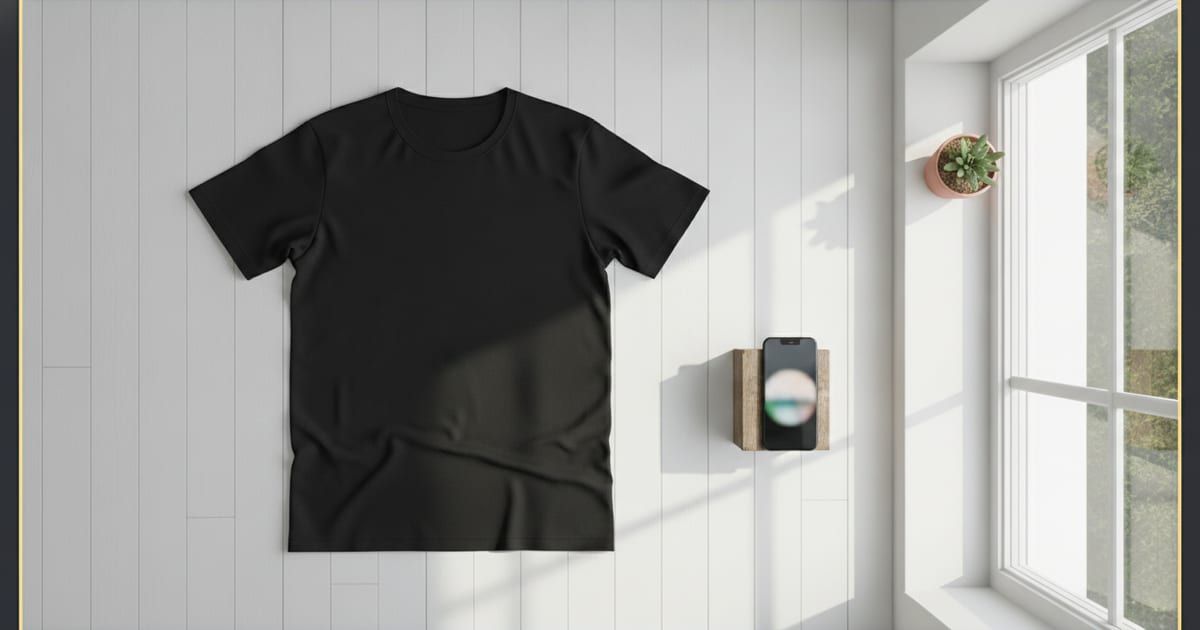
The single biggest quality lever is soft, even light, and a large window gives it for free. Shoot near a north-facing window or on an overcast day, with the garment lit from the side rather than head-on. Avoid direct sunlight and phone flash — both create hard shadows and blow out fabric detail. If the light looks too harsh, diffuse it with a sheer white curtain. Good light is what separates a photo that looks shot in a studio from one that looks shot on a bed.
Background: clean and consistent
A studio backdrop just means “nothing distracting.” A large sheet of poster board, a plain wall, or a clean wood surface all work. The important part is consistency — use the same background across a product and across your catalog so the set looks deliberate. Neutral tones (white, light grey, warm wood) flatter almost any garment and keep attention on the product.
The setup: flat lay or hang
For a flat lay, place the garment on your surface, steam or smooth every wrinkle, and shoot straight down from directly above so the shape isn’t distorted. To show more structure, hang the piece on a slim hanger against your background. Either way, fill the frame, keep the camera parallel to the garment, and leave a little margin. This flat or hung shot is also the input for the next step, so it’s worth two careful minutes.
The hard part: on-model shots without a model
This is where the no-studio approach used to break down — you can shoot a great flat lay at home, but you can’t put it on a model without a shoot. AI closes that gap. Upload your flat photo to Mockup Tool and it generates an on-model image — your garment on a realistic model with natural drape and lighting — in about 15 seconds on iPhone, at 4K. Because it’s built from your actual garment, the fit and print stay true and the image is unique to your shop. It’s the same tool as our free mockup generator, and it’s what turns a home flat lay into a full listing set.
Drag the handle to compare a flat home shot with the generated on-model result:


A repeatable no-studio workflow
- Set up near a window with a plain background you’ll reuse every time.
- Steam the garment and shoot a clean flat lay straight down.
- Generate on-model images from that photo for the listing’s lead shots.
- Keep the flat lay and a close-up for detail slots.
- Reuse the exact same setup for every product so the catalog matches.
None of this needs a booking or a budget. A window, two careful minutes, and an app replace the studio, the model, and the shoot — and because the photos come from your own garment, they look like a real brand made them, not like a template every other shop is using.
Frequently Asked Questions
Can I get professional clothing photos without a studio?
Yes. Soft window light, a clean background, and a phone produce catalog-quality flat lays, and an AI mockup app generates the on-model shots — the part that used to require a studio and a model.
What lighting is best without a studio?
Soft, indirect daylight — a north-facing window or an overcast day. Light the garment from the side, and avoid direct sun and phone flash, which cause hard shadows and blown-out fabric.
How do I get on-model shots without a model?
Photograph the garment flat and use an AI mockup app like Mockup Tool to generate an on-model image from that photo in about 15 seconds. It’s free to download on iOS, and the result is unique to your shop because it’s built from your real product.
Do I need a professional camera?
No. A modern phone camera in good window light is more than enough. Lighting, a clean background, and steaming the garment matter far more than the camera.
