Blog · November 4, 2026
Long Sleeve Mockups: How to Show the Sleeve Print
Short answer
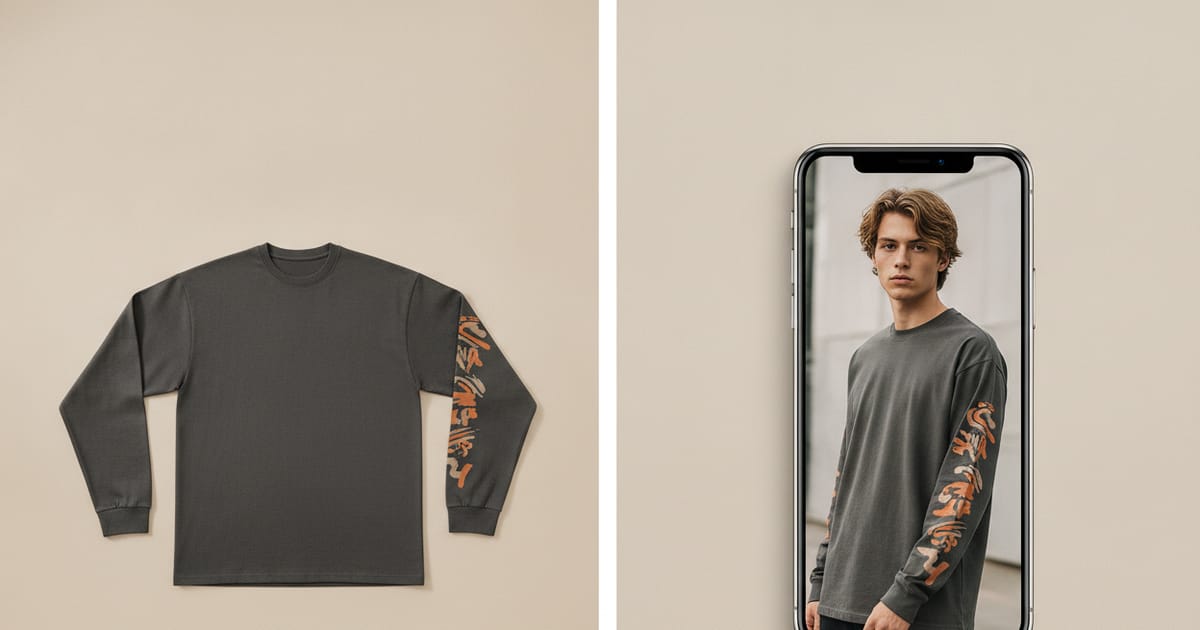
To make a long sleeve mockup, photograph the shirt flat with both sleeves spread out, then use an AI mockup generator to place it on a model — this shows the sleeve print on an arm, which a folded flat lay hides. Mockup Tool builds it from your real long sleeve in about 15 seconds on iPhone at 4K, so wrist hits, cuff prints, and down-the-sleeve typography read the way you designed them.
A long sleeve is bought for the sleeves. The chest print matters, but what makes someone choose a long sleeve over a tee is the arm — the graphic running down it, the wrist hit, the cuff detail. And that is exactly what a flat photo destroys: fold the shirt and half the sleeve disappears; lay it flat and the sleeve runs off to the side where the print warps and nobody can read it. Most templates don’t help either, because they rarely match where your print actually sits. The fix is an on-model mockup that puts the sleeve on an arm — and you don’t need a photoshoot to get one.
Why long sleeves are the hardest tee to shoot flat
A short-sleeve tee survives a flat lay because its whole design lives on the front panel, which stays visible. A long sleeve spreads its value across a surface that only exists in three dimensions. Flat, the sleeves either fold under (hiding the print) or splay out sideways (distorting it), and the drape that shows a cuff graphic or a wrist hit simply isn’t there. So the flat photo doesn’t just look plainer than the product — it omits the feature the customer is paying for.
What a long sleeve mockup needs to show
- The sleeve print on an arm — down-the-sleeve typography readable top to bottom.
- The wrist hit — where a cuff graphic or hem print lands on the hand.
- How the sleeve drapes — the fabric fold that a flat lay flattens out.
- Front and sleeve together — so the full design reads as one piece.
How to make a long sleeve mockup
- Lay the shirt flat and spread both sleeves fully open, print side up — don’t let them fold under.
- Light it evenly and shoot straight down so the sleeve graphic isn’t distorted.
- Fill the frame with the whole garment, cuffs included.
- Run it through Mockup Tool to generate it on a model — arms visible, so the sleeve print lands on an arm.
- Generate a slightly angled or arm-forward shot so the down-the-sleeve design reads.
Because the image is built from your real long sleeve rather than a stock blank, the sleeve typography, cuff print, and placement carry over onto the model instead of defaulting to a plain blank with no sleeve graphic. The cleaner and flatter you spread the sleeves in the input photo, the more faithfully the arm print renders.
Which shots sell a long sleeve best
Lead with a shot where an arm is slightly forward or bent, so the sleeve graphic faces the camera — a straight-on, arms-flat pose hides the very thing you’re selling. A back shot helps when the design wraps, and a close crop on the cuff sells wrist hits. Generating on-model lets you produce that set — front, arm-forward, cuff detail — on different body types without a shoot, which matters for fall and winter drops where long sleeves carry the season.
What it shows — and what it doesn’t
A long sleeve mockup is a realistic preview of how the design reads on a body — sleeve print, drape, proportion — not a technical fitting. It won’t certify exact sleeve length on a specific arm or how the fabric moves in wear; a real sample still does that. For listing and campaign images, it replaces the studio shoot and produces them the same day you photograph the shirt.
For skate, band, and streetwear drops
Long sleeves are a staple of skate brands, band merch, and streetwear labels every fall and winter, and those audiences notice when the sleeve print is faked or missing. Photograph each design flat and generate full campaign imagery per drop — no shoot scheduled, no sleeve graphic lost. See the long sleeve mockup generator, or start with the free mockup generator.
Frequently Asked Questions
How do I make a long sleeve mockup?
Photograph the shirt flat with both sleeves spread open print-side up, then use an AI mockup generator like Mockup Tool to place it on a model. Building from your real garment puts the sleeve print on an arm — the detail a folded flat lay hides.
Why don’t flat photos work for long sleeves?
A long sleeve’s value lives on the sleeves, which only read in three dimensions. Flat, the sleeves fold under and hide the print or splay out and distort it, so the wrist hit and down-the-sleeve graphic — the reason someone buys it — disappear.
Can I make long sleeve mockups without a model?
Yes. An AI mockup generator places your long sleeve on a realistic model from a flat photo — no model or studio. Mockup Tool runs on iPhone, generates in about 15 seconds, and exports at 4K.
Will the sleeve print stay accurate in the mockup?
It carries over because the image is built from a photo of your real shirt, not a generic blank. The flatter and more fully you spread the sleeves in the input photo, the more precisely the arm print and cuff detail render on the model.
