Blog · September 23, 2026
Oversized T-Shirt Mockups: How to Show the Real Fit
Short answer
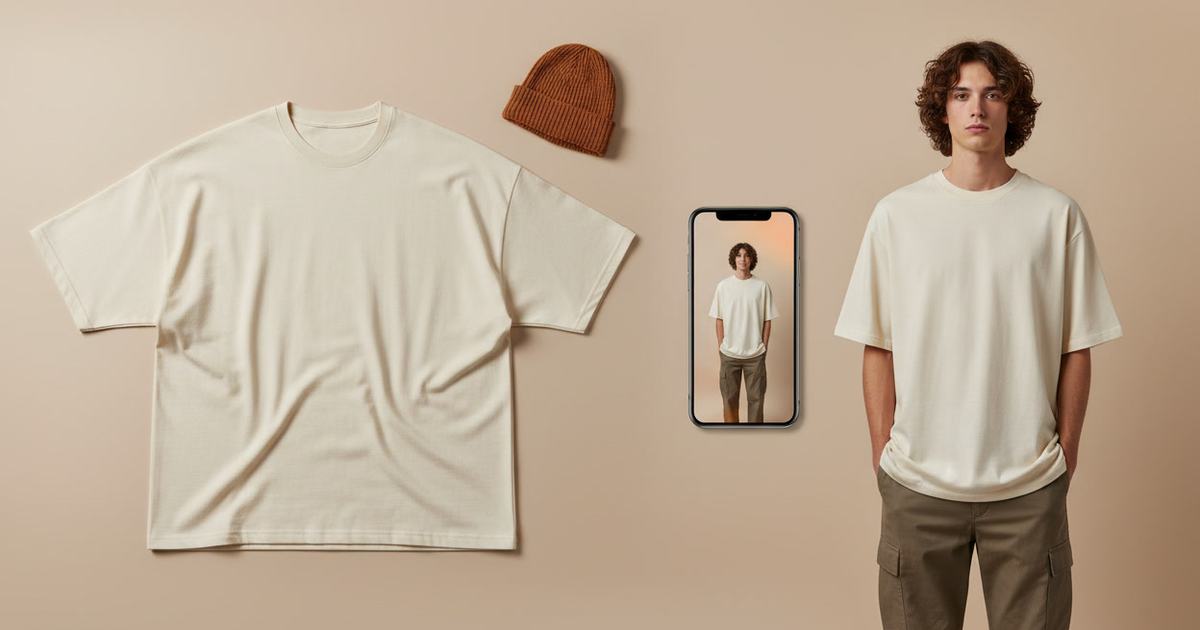
To make an oversized t-shirt mockup, photograph your actual boxy tee flat, then use an AI mockup generator to put it on a model — this shows the drop shoulder and relaxed drape a flat photo and slim-fit templates both miss. Mockup Tool builds it from your real garment in about 15 seconds on iPhone at 4K, so the proportions customers see are the proportions they get.
Oversized tees live or die by their silhouette. The print matters, but what a streetwear buyer is really judging is the cut — how the shoulders drop, how the body drapes, where the hem lands. A flat lay shows none of it, and stock templates make it worse: most carry a slim or regular fit, so your relaxed-fit design gets displayed stretched onto the wrong body. The customer sees a fit you don’t sell. A mockup from your real garment fixes exactly that.
Why slim templates ruin an oversized tee
The whole appeal of an oversized tee is proportion, and proportion is the one thing a template can’t fake. Drop a boxy design onto a slim-fit template and the drop shoulders vanish, the body looks fitted, and the length reads normal — the exact opposite of what you’re selling. A buyer who orders expecting the pictured slim look and receives a boxy tee feels misled; a buyer who wanted oversized scrolls past because the photo doesn’t show it. Either way the mismatch costs the sale.
How to make an oversized tee mockup
- Lay the tee flat without stretching it, so the true boxy width and length show.
- Light it evenly and shoot straight down; keep the drop-shoulder seams visible.
- Fill the frame with the garment; keep the background plain.
- Run it through Mockup Tool to generate it on a model — the AI keeps the actual cut instead of defaulting to a slim template.
- Generate a few angled and styled shots — silhouette reads best at a slight angle.
Because it’s built from your real tee, the drop shoulders and boxy body render as oversized on the model rather than stretched onto a slim form — so the proportions customers see match what ships. The cleaner and more honestly you lay the garment out, the truer the fit.


Why angled shots sell oversized best
Straight-on shots flatten silhouette; a slight angle is what reveals the drop shoulder and the drape down the side. Generating on-model lets you produce those angled and styled shots — the ones that actually communicate an oversized fit — as a full set, on different body types, without booking a shoot. For streetwear especially, that silhouette-forward set is the difference between a listing that reads as premium and one that reads as a blank.
What it shows — and what it doesn’t
An oversized tee mockup is a realistic preview of the cut and drape on a body, not a technical fitting. It shows how the silhouette reads; it won’t certify exact measurements on a specific person. For listing and social images — the everyday need — it replaces the studio shoot at a fraction of the cost.
See the oversized t-shirt mockup generator, or try the free mockup generator on a tee you have now.
Frequently Asked Questions
How do I make an oversized t-shirt mockup?
Photograph the tee laid flat without stretching it, then use an AI mockup generator like Mockup Tool to place it on a model. Building from your real garment keeps the drop shoulders and boxy drape that a slim-fit template flattens.
Why do oversized tees look wrong in template mockups?
Most templates carry a slim or regular fit, so a boxy design gets displayed stretched onto a fitted body — the drop shoulders and relaxed drape disappear. The customer sees a fit you don’t actually sell, which drives mismatched expectations and returns.
Can I show the real oversized fit without a shoot?
Yes. An AI mockup generator renders your actual garment on a model from a flat photo, preserving the true cut. Mockup Tool runs on iPhone, generates in about 15 seconds, and exports at 4K — angled and styled shots included.
What’s the best angle for an oversized tee photo?
A slight angle rather than straight-on, because it reveals the drop shoulder and the drape down the side — the details that communicate an oversized fit. Generate a few angled and styled variations and lead with the one that shows the silhouette clearest.
