Blog · September 21, 2026
Hoodie Mockups: How to Make Realistic On-Model Ones
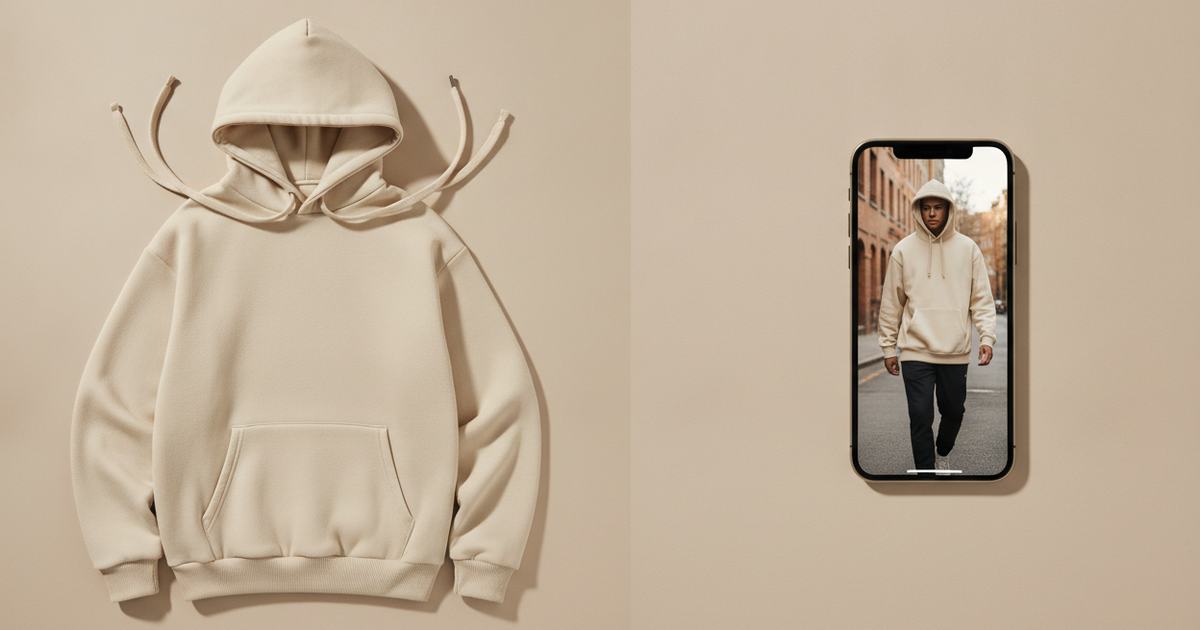
Short answer
To make a realistic hoodie mockup, photograph the hoodie laid flat in even light, then use an AI mockup generator to put it on a model — this keeps the hood volume, drawstrings, pocket, and fabric weight a template flattens. Mockup Tool builds it from your real hoodie in about 15 seconds on iPhone at 4K, so a heavyweight fleece looks substantial instead of pasted-on.
A hoodie is one of the hardest garments to fake convincingly. The hood has volume, the drawstrings hang, the kangaroo pocket has its own seams, and heavyweight fleece drapes in a way flat artwork never captures. Drop your design onto a stock hoodie template and all of that reads as clip art — which is a problem when the whole reason someone pays more for a premium hoodie is that it looks substantial. A mockup built from your real hoodie keeps those details, and you don’t need a shoot.
What templates get wrong about hoodies
Templates assume a flat, simple surface. A hoodie is the opposite: the hood adds depth behind the neck, the drawstrings break the symmetry, the pocket casts its own shadow, and 400gsm fleece sits heavier than the thin blank most templates were shot on. So a templated hoodie looks lighter and cheaper than the one you ship, and the embroidery or puff print you paid for gets flattened into a decal. The details that justify the price are exactly the ones a template loses.
How to make a hoodie mockup
- Lay the hoodie flat, smooth it, and arrange the hood and drawstrings so they read naturally.
- Light it evenly and shoot straight down with the whole garment — hood, pocket, cuffs — in frame.
- Fill the frame with the hoodie; keep the background plain.
- Run it through Mockup Tool to generate it on a realistic model — the AI preserves fabric weight, drawstrings, and print from your photo.
- Generate on a couple of body types and match the backdrop to your season or channel.
Because it’s built from your real hoodie rather than a stock blank, the hood, drawstring tips, pocket seams, and print placement carry over — embroidery and puff prints survive the transfer instead of turning into a flat graphic. The cleaner the flat lay, the more of that detail comes through.


What it shows — and what it doesn’t
A hoodie mockup is a realistic preview of how the garment reads on a body — drape, texture, print placement — not a technical fitting. It won’t certify exact measurements on a specific person or how the fleece wears over time; a real sample still does that. For listing and social images, it replaces the studio shoot and produces them the same day you photograph the hoodie.
For premium blanks and merch drops
This matters most for brands selling premium fleece, custom embroidery, or puff prints, where the look is the value. Photograph the hoodie once and generate every visual you need for the season — front, back, styled — on consistent models, without a shoot per design. See the hoodie mockup generator, or start with the free mockup generator.
Frequently Asked Questions
How do I make a realistic hoodie mockup?
Photograph the hoodie flat in even light with the hood and drawstrings arranged naturally, then use an AI mockup generator like Mockup Tool to place it on a model. Building from your real garment keeps the hood volume, drawstrings, pocket, and fabric weight a template flattens.
Why do hoodies look bad in template mockups?
Templates assume a flat surface, but a hoodie has hood volume, hanging drawstrings, a pocket, and heavy fleece drape. A template flattens all of it, so the garment looks lighter and cheaper than what you ship and embroidery or puff prints turn into flat decals.
Can I make hoodie mockups without a model?
Yes. An AI mockup generator places your hoodie on a realistic model from a flat photo — no model or studio. Mockup Tool runs on iPhone, generates in about 15 seconds, and exports at 4K.
Will embroidery and puff prints show in the mockup?
They carry over because the image is built from a photo of your real hoodie rather than a generic blank. The clearer your flat lay, the more faithfully raised details like embroidery and puff prints render on the model.
