Blog · September 25, 2026
Sweatpants & Jogger Mockups: How to Show the Fit
Short answer
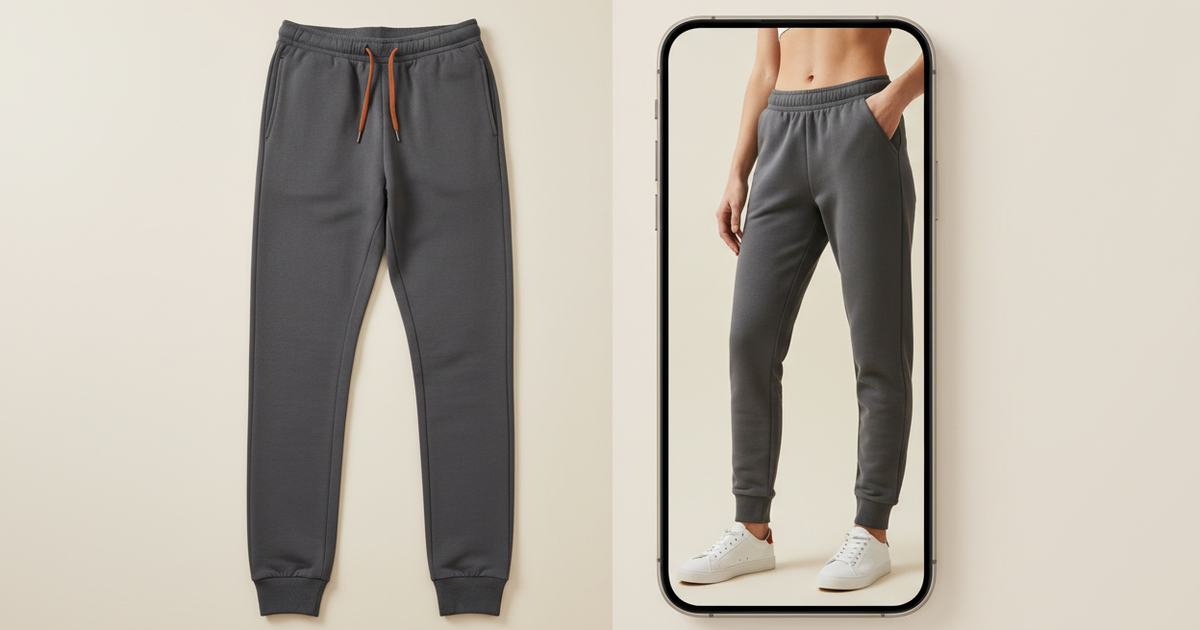
To make a sweatpants mockup, photograph the pair flat in even light, then use an AI mockup generator to put them on a model — this shows the taper, rise, and how the cuff stacks, none of which read flat. Mockup Tool builds it from your real pair in about 15 seconds on iPhone at 4K, so joggers stop underperforming your tops.
Bottoms are notoriously hard to sell from flat photos, and sweatpants are the clearest case. The entire purchase decision — the taper down the leg, the rise, how the cuff stacks on a shoe — only exists on a body. Laid flat, a tapered jogger and a straight sweatpant look nearly the same, so buyers can’t tell what they’re getting and joggers underperform tops in most catalogs. An on-model mockup puts the fit back, without a shoot.
Why flat photos fail bottoms
A top laid flat keeps most of its shape; a pair of sweatpants doesn’t. Flat, you can’t see the taper, you can’t see where the rise sits, and you definitely can’t see the cuff stack — the little bunch above the shoe that tells a buyer whether these are cropped, full-length, or tapered. Those are exactly the details a jogger shopper zooms in on, and they’re invisible until the pants are worn.
How to make a sweatpants mockup
- Lay the pair flat, smoothed, with the full length and the cuff clearly visible.
- Light it evenly and shoot straight down so the taper and rise stay true.
- Fill the frame with the garment; keep the background plain.
- Run it through Mockup Tool to generate them on a realistic model — fit and taper intact.
- Generate on a couple of body types and a full-length frame so the cuff stack shows.
Because it’s built from your real pair, the taper, rise, and cuff carry over onto the model instead of defaulting to a generic straight leg. The cleaner the flat lay, the more honestly the fit renders.


The matching-set money shot
For brands selling matching sets, this unlocks the shot that sells the bundle: the hoodie or crewneck and the sweatpants generated in one consistent style, on the same model, so the set purchase is obvious on the product page. Generating both from flat photos in one session keeps them visually matched without a shoot. See the sweatpants mockup generator, or start with the free mockup generator.
What it shows — and what it doesn’t
A sweatpants mockup is a realistic preview of fit and taper on a body, not a technical fitting. It shows how the leg reads; it won’t certify exact inseam on a specific person or how the fabric moves in wear. For listing and social images — the everyday need — it replaces the studio shoot at a fraction of the cost.
Frequently Asked Questions
How do I make a sweatpants mockup?
Photograph the pair flat in even light with the full length and cuff visible, then use an AI mockup generator like Mockup Tool to place them on a model. Building from your real pair keeps the taper, rise, and cuff stack that a flat photo hides.
Why do sweatpants and joggers look the same flat?
Flat on a table, taper, rise, and cuff stack all disappear, so a tapered jogger and a straight sweatpant look nearly identical. Those are the exact details a buyer judges, and they only appear once the pants are on a body.
Can I make jogger mockups without a model?
Yes. An AI mockup generator renders your pair on a realistic model from a flat photo — no model or studio. Mockup Tool runs on iPhone, generates in about 15 seconds, and exports at 4K.
Can I show a matching hoodie-and-sweatpants set?
Yes. Generate both from flat photos in one consistent style on the same model, so the set reads as a bundle on the product page. That matched-set shot is often what drives the larger purchase.
